
MongoDB
Airbyte’s certified MongoDB connector gives you these features:
- Change Data Capture (CDC) using MongoDB change streams, read directly with the MongoDB driver.
- Full refresh and incremental sync modes for every collection.
- Reliable replication for collections of any size with checkpointing. Interrupted syncs resume from the last checkpointed document instead of restarting.
- Choose a discovered schema, with fields sampled from your documents, or schemaless mode, which syncs each document as one JSON object.
In version 3.0.0, this connector’s Docker image changed from airbyte/source-mongodb-v2 to airbyte/source-mongodb. The connector definition remains unchanged.
This page covers setup, replication and reference information, including data type mapping, configuration parameters and the changelog. If you’re upgrading from version 2.x, read migration guide first.
Quick start
Set up a MongoDB source in four steps:
- Create a dedicated read-only MongoDB user.
- Find the connection string of your replica set or sharded cluster, hosted on MongoDB Atlas or self-hosted.
- Create the MongoDB source in Airbyte.
- Allow inbound traffic from Airbyte if your cluster restricts incoming connections.
Requirements
- A replica set or a sharded cluster connected through
mongos. A standalonemongodhas no oplog or change streams. Full Refresh works, but Incremental sync fails when the change stream opens. A single-node replica set works for development. See Convert a Standalone to a Replica Set. - MongoDB 4.4 or later. The connector is tested against MongoDB 7.0. Deletes include the deleted document only with MongoDB 6.0 or later and pre-images enabled on the collection.
- On MongoDB Atlas, a dedicated cluster at M10 tier or above. Shared tiers M0, M2 and M5 don’t support required operations and may fail during connection setup.
- An oplog large enough to cover the gap between syncs, with extra capacity. See MongoDB Oplog and Change Streams.
Step 1: Create a read-only MongoDB user
Create a dedicated, read-only user to replicate data. You can use an existing MongoDB user with the privileges described below. A dedicated user helps you identify connector activity in logs. You can also revoke its access without affecting anything else.
The required privileges depend on how many databases you configure:
| Databases configured | Required privileges |
|---|---|
| One | The built-in read role on that database. The change stream is opened on the database itself, so no cluster-wide privilege is needed. |
| Several | readAnyDatabase (on Atlas: the Only read any database built-in role). Changes from several databases are read through one cluster-wide change stream, which requires read privileges on every database. |
In either case, the connector only needs read access. It never writes to your cluster or reads the local or config databases.
MongoDB Atlas
-
Log in to the MongoDB Atlas dashboard.
-
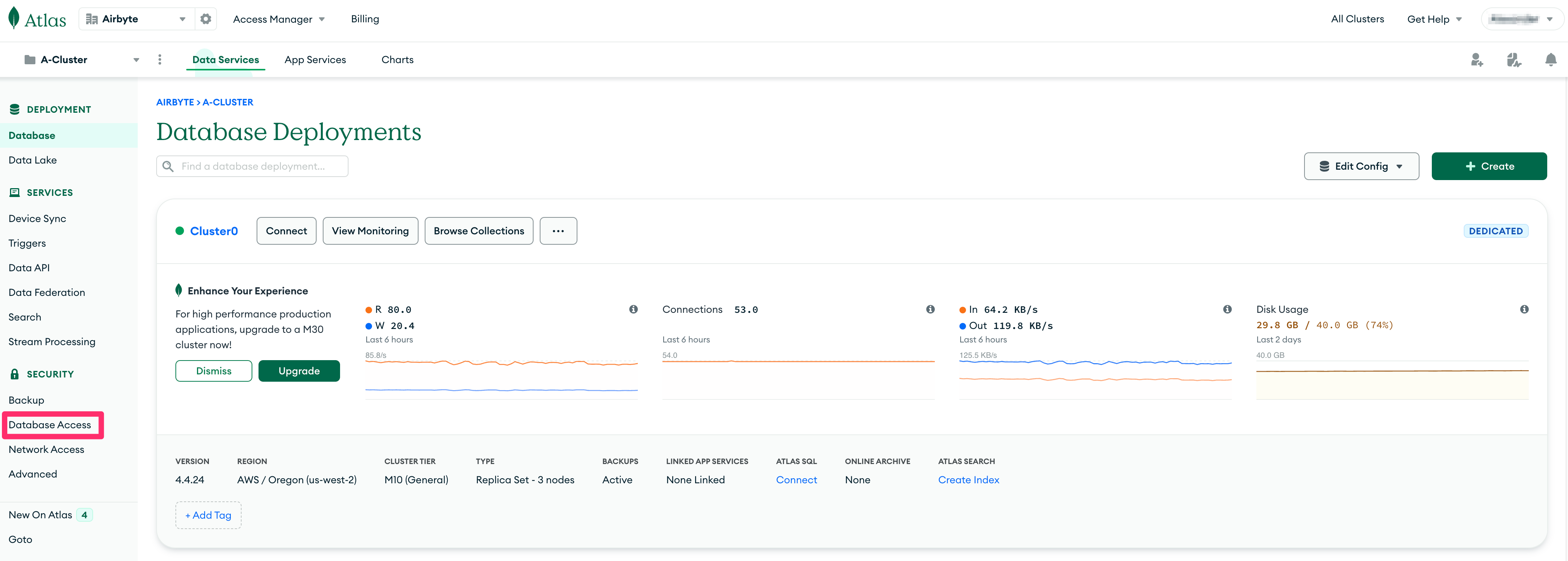
From the dashboard, click “Database Access” under “Security”.
-
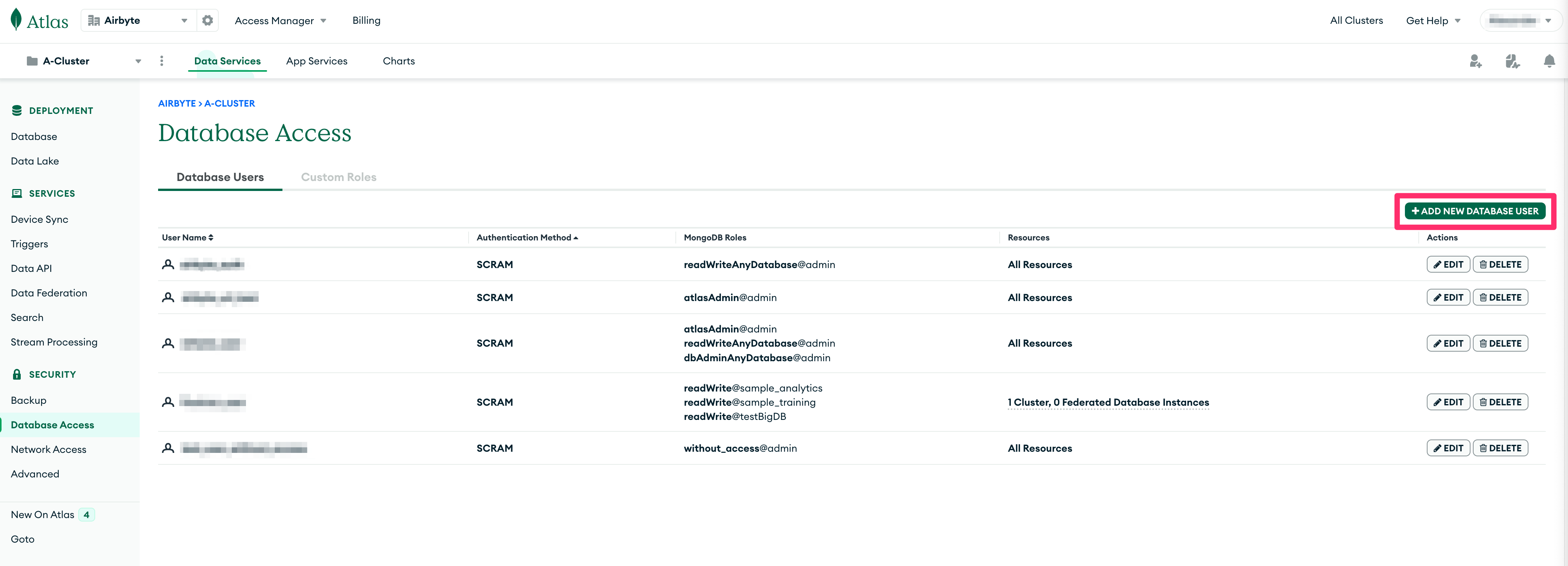
Click the ”+ ADD NEW DATABASE USER” button.
-
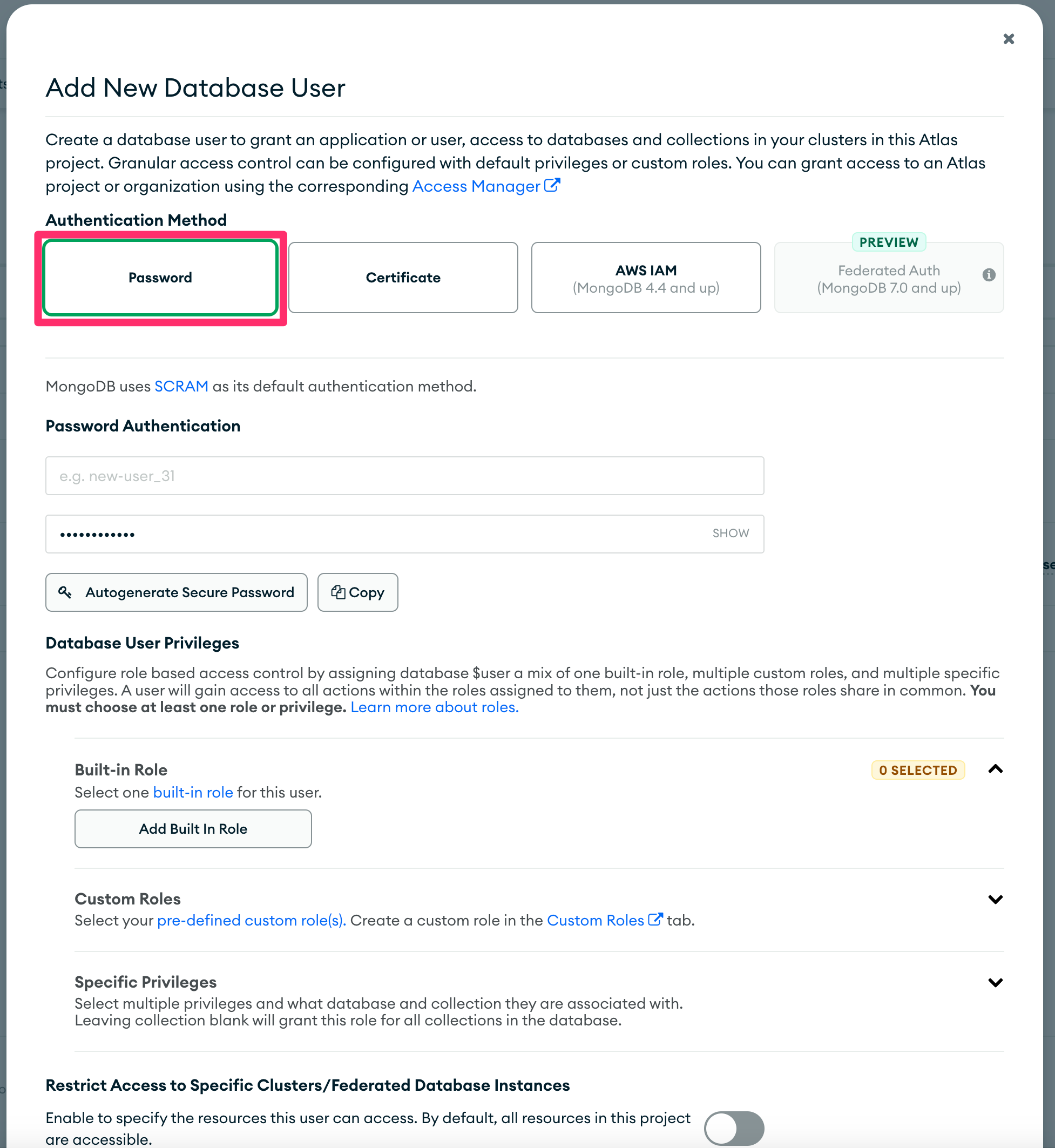
In the “Add new Database User” modal, choose “Password” for the “Authentication Method”.
-
In “Password Authentication”, enter
READ_ONLY_USERor your chosen username in the first text box. Enter a password in the second. You’ll enter both in the Airbyte source during Step 3.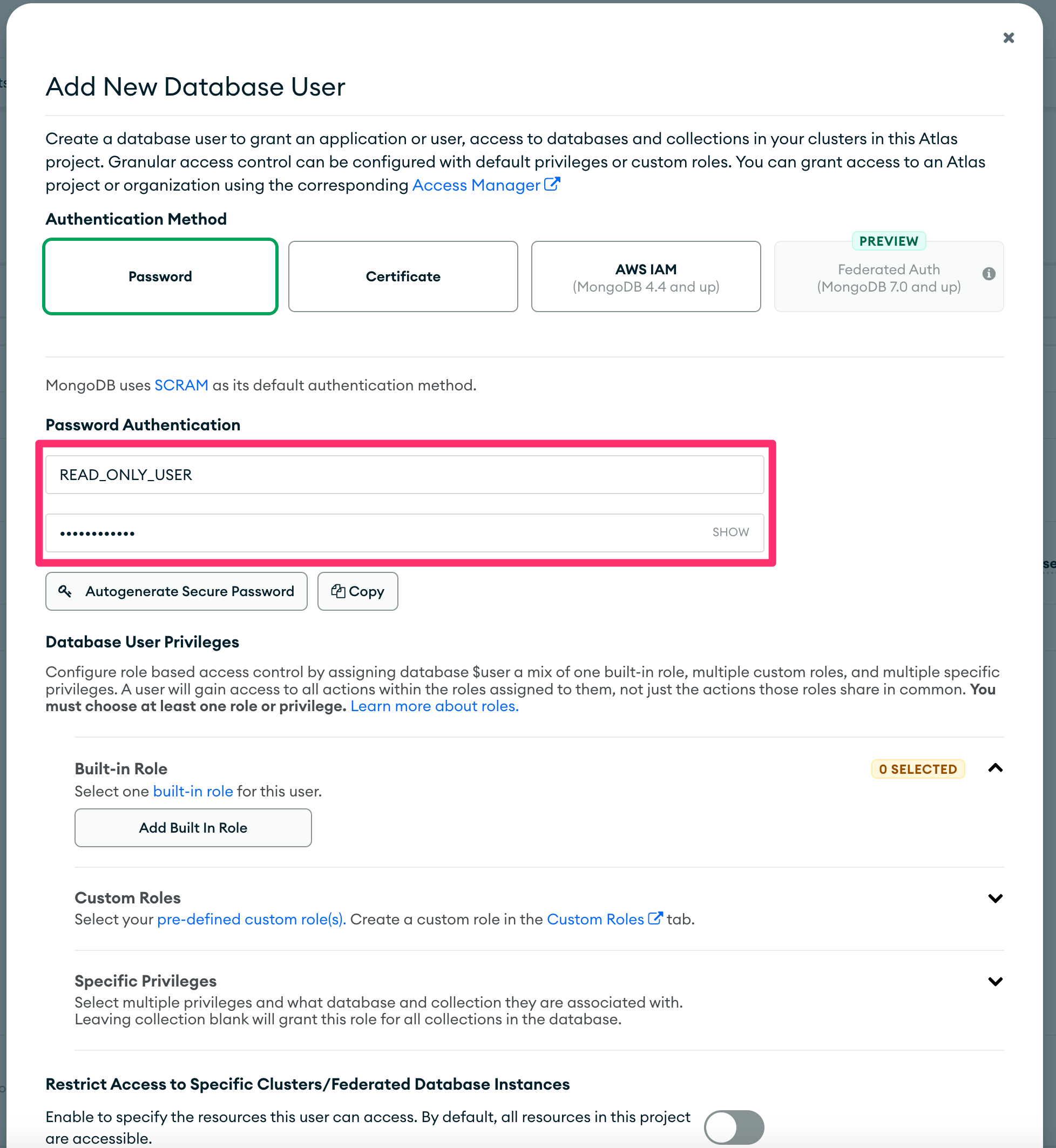
-
Under “Database User Privileges”, grant read access in one of two ways:
-
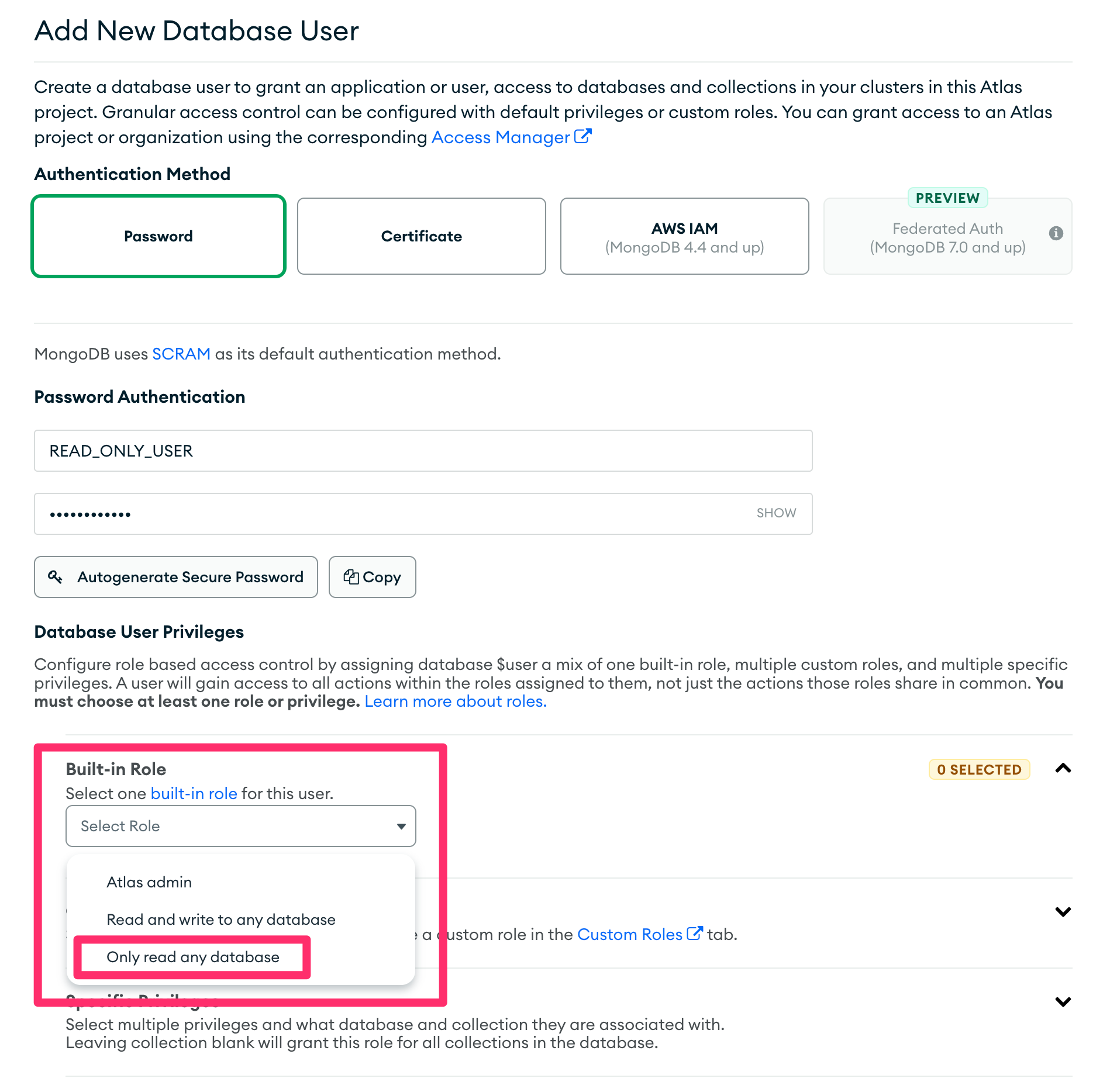
Under “Built-in Role”, click “Select one built-in role for this user” and choose “Only read any database”.
-
Alternatively, under “Specific Privileges”, click “Add Specific Privilege” and add
readAnyDatabase.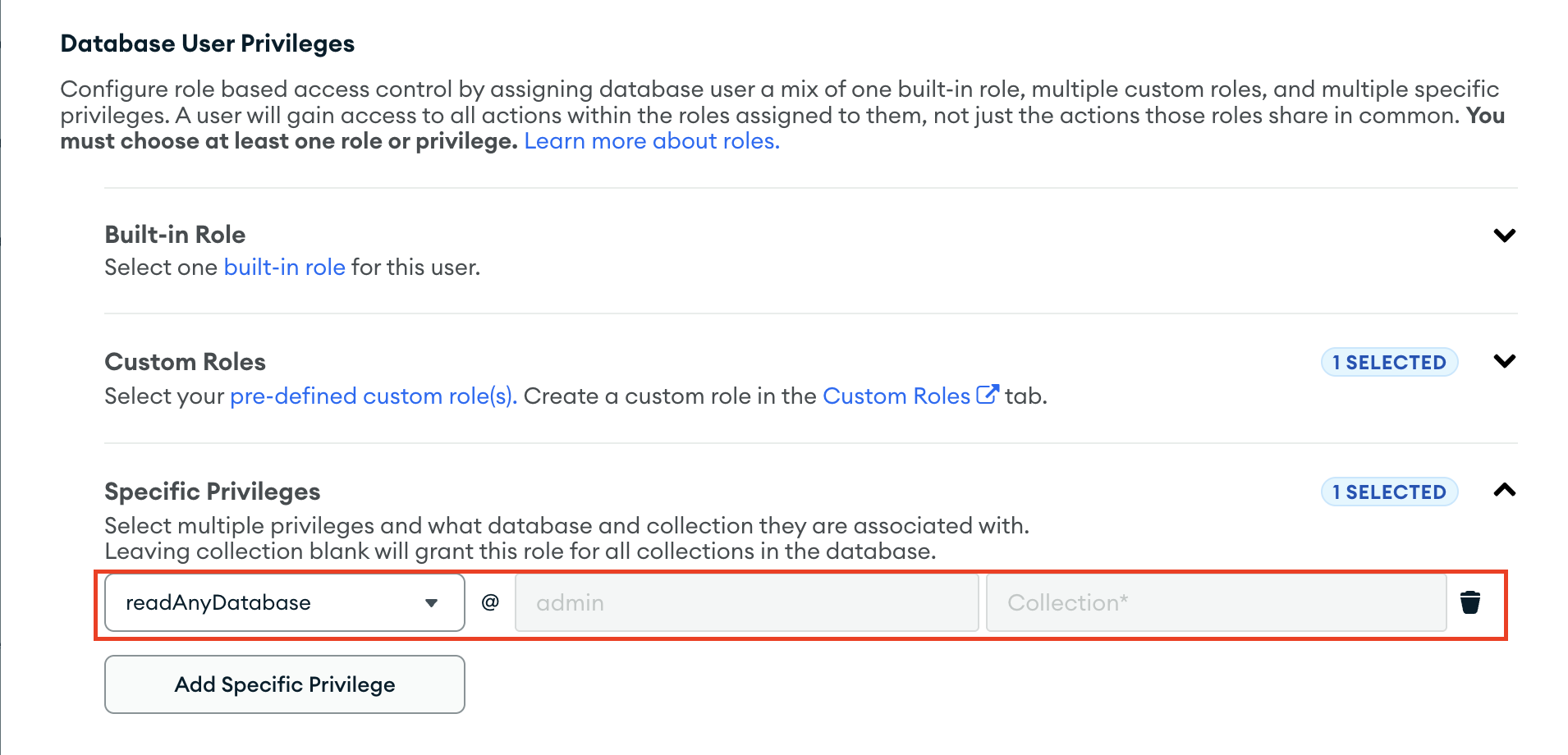
-
:::info
Both options grant readAnyDatabase, which you need when configuring multiple databases. For one database with narrower privileges, use a custom role with the read role on that database.
:::
-
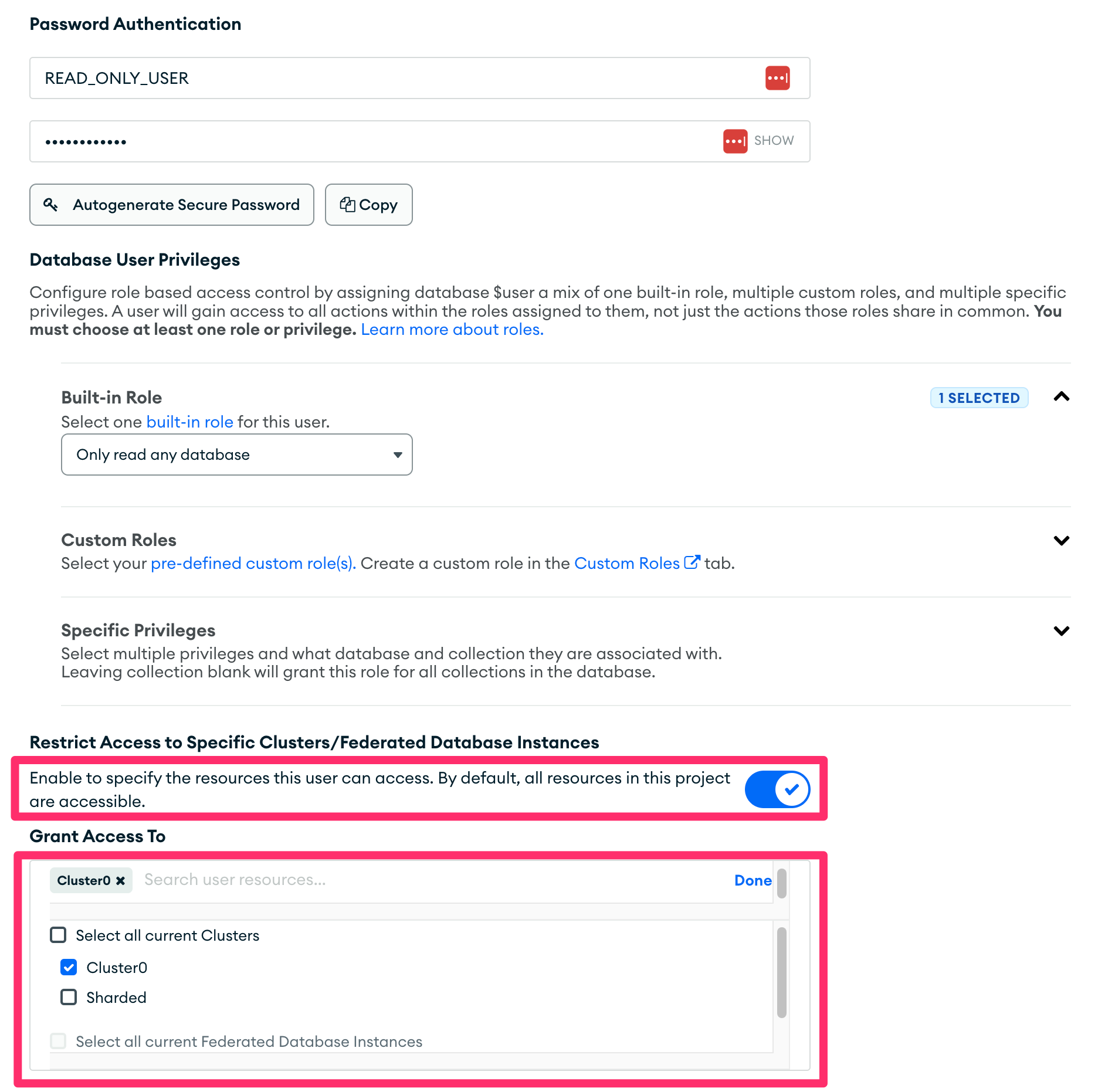
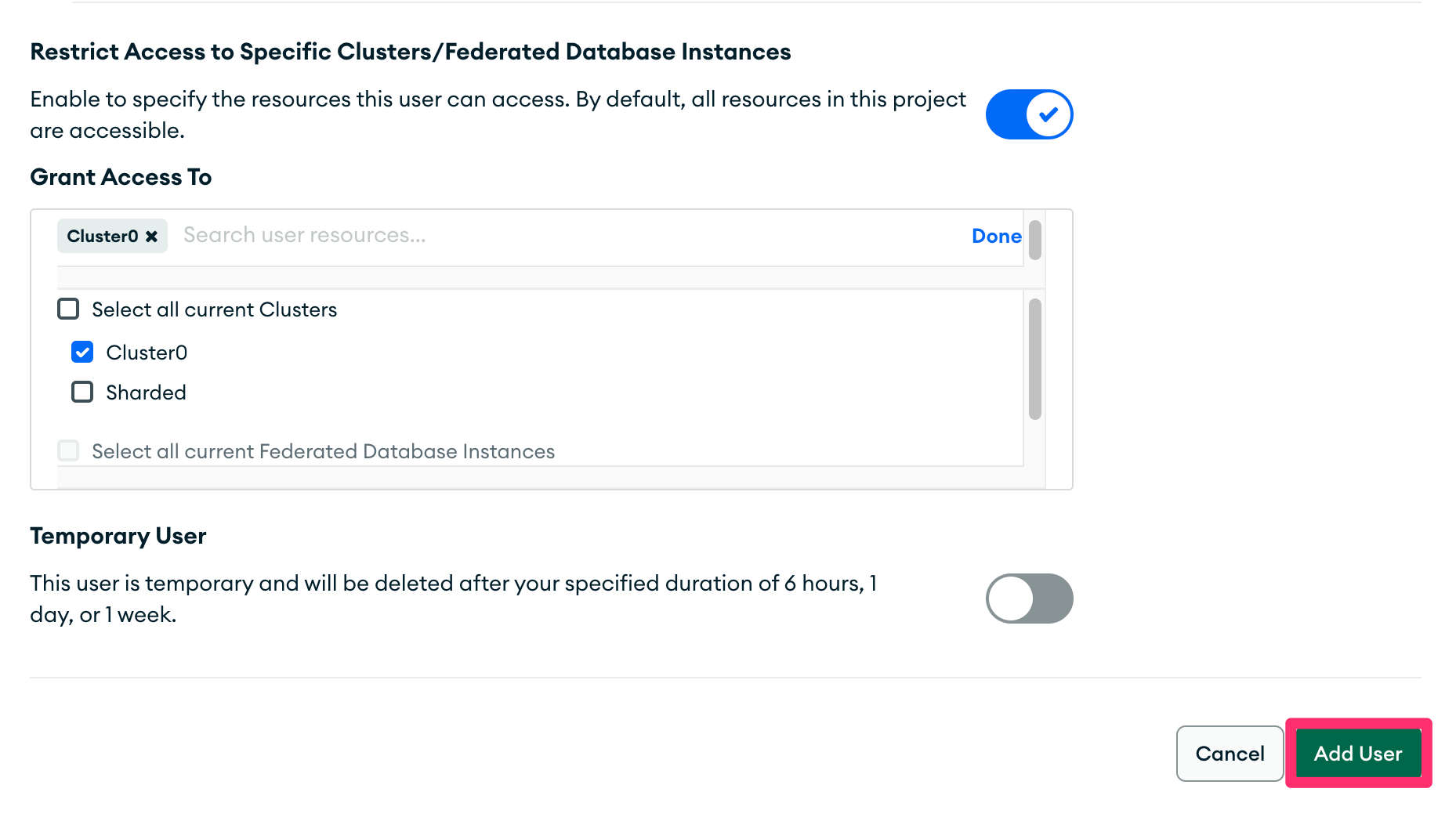
Enable “Restrict Access to Specific Clusters/Federated Database instances”. Select only the cluster you want to replicate.
-
Click “Add User” at the bottom to save the user.
Self-hosted
These instructions use the MongoDB shell (mongosh). To install it, follow these instructions.
-
In a terminal, connect to the cluster as a user who can create users. For example, use one with the
userAdminAnyDatabaserole:> mongosh "<connection string to cluster>" --username <user with admin permissions> -
Switch to the
admindatabase:test> use admin switched to db admin -
Create the
READ_ONLY_USERuser, or choose another name. To sync one database, grant it thereadrole:admin> db.createUser({user: "READ_ONLY_USER", pwd: "READ_ONLY_PASSWORD", roles: [{role: "read", db: "TARGET_DATABASE"}]})To sync multiple databases, grant
readAnyDatabaseinstead:admin> db.createUser({user: "READ_ONLY_USER", pwd: "READ_ONLY_PASSWORD", roles: [{role: "readAnyDatabase", db: "admin"}]})
:::note
Replace READ_ONLY_PASSWORD with your chosen password and TARGET_DATABASE with the database you want to replicate. Create the user in the admin database. The connector authenticates against admin.
:::
-
Ensure every replica set member, or every
mongos, requires authentication. Each must accept connections from Airbyte’s network. Check these keys in each member’s configuration file, which is/etc/mongod.confon most Linux distributions. Restart the process after making changes:net: bindIp: localhost,<the interface Airbyte reaches this member on> security: authorization: enabled
:::note
net.bindIp lists the interfaces the member listens on. 0.0.0.0 accepts connections from every interface. If you use it, restrict access with a firewall or the Step 4 IP allow list. security.authorization: enabled makes the member reject unauthenticated clients. Replica set members must also authenticate with each other using a keyfile or x.509 certificates. See Internal/Membership Authentication.
:::
Step 2: Find the cluster connection string
MongoDB Atlas
Atlas is MongoDB’s cloud-hosted offering. To find an Atlas-hosted cluster’s connection string:
-
Log in to the MongoDB Atlas dashboard.
-
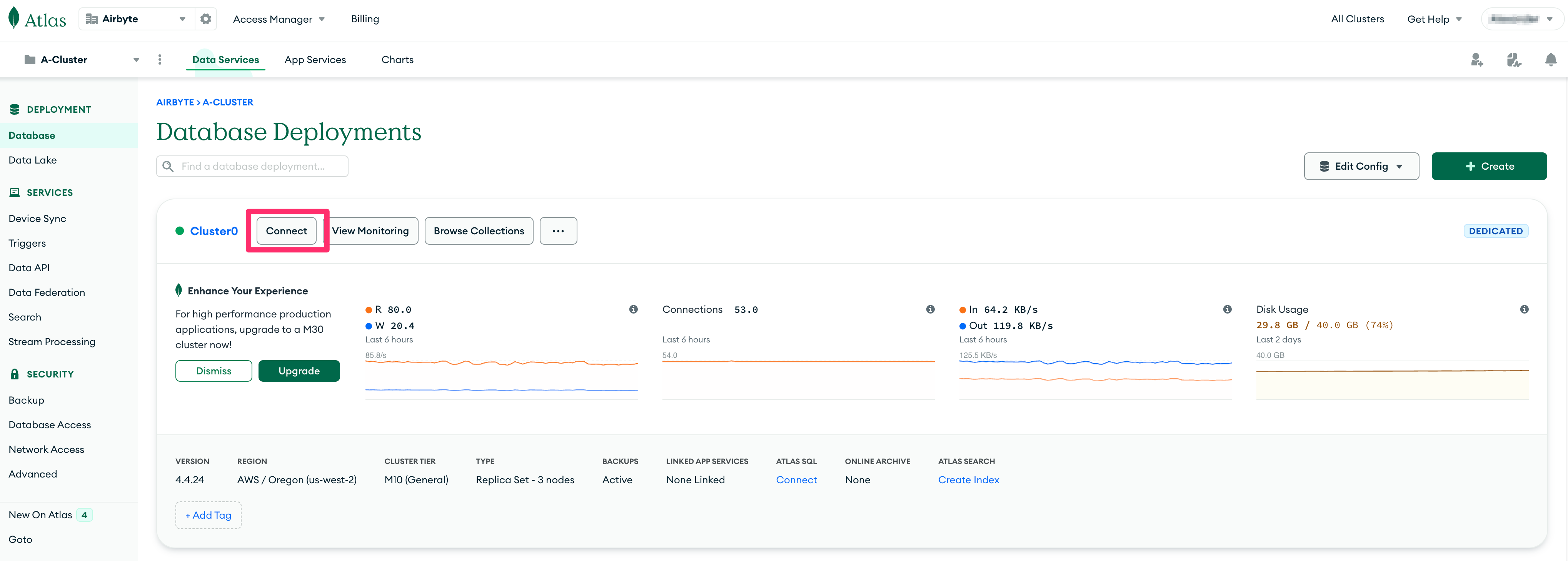
From the dashboard, click the source cluster’s “Connect” button.
-
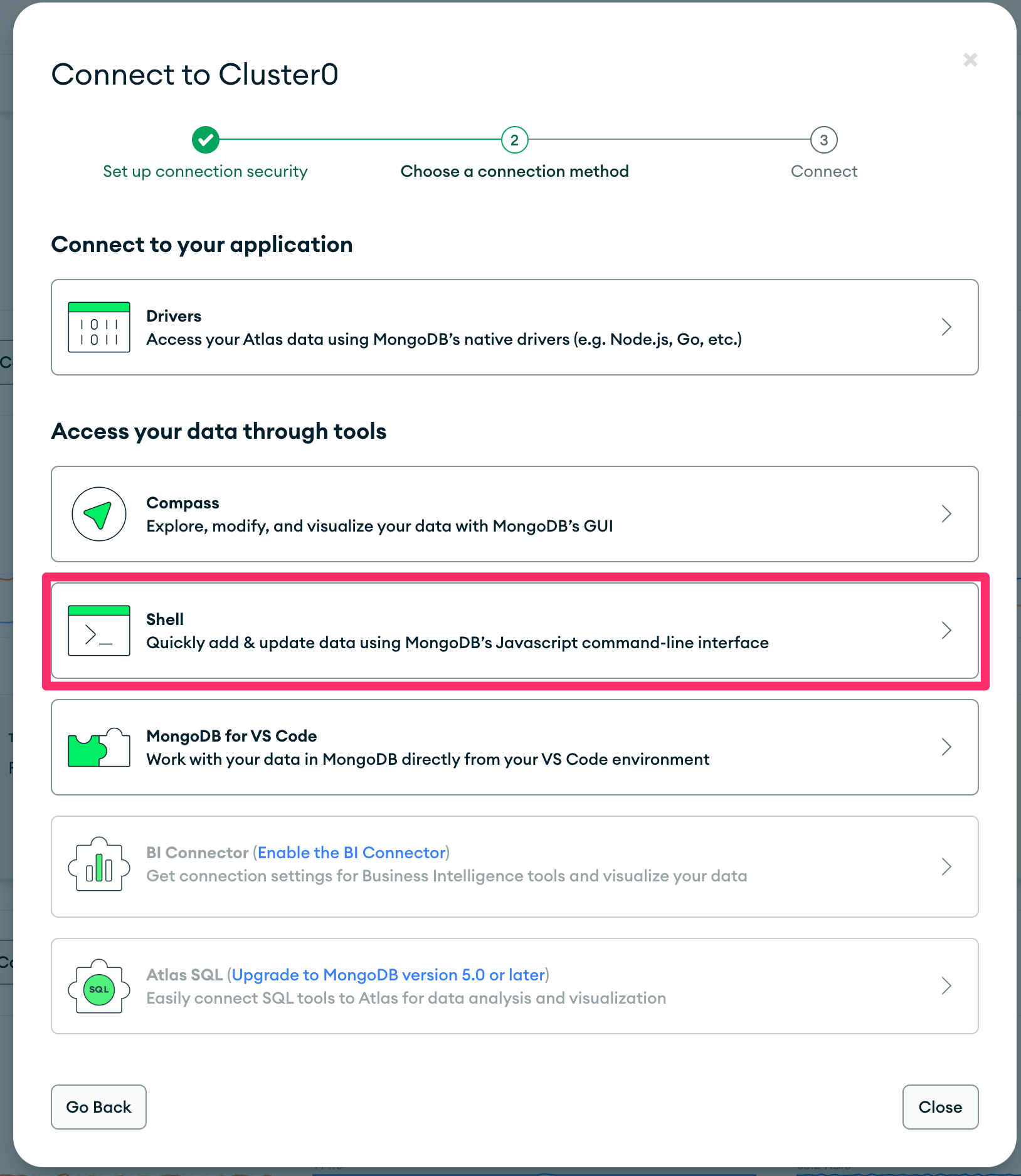
In the “Connect to <cluster name>” modal, select “Shell” under “Access your data through tools”.
-
Copy the connection string from “2. Run your connection string in your command line” in the modal.
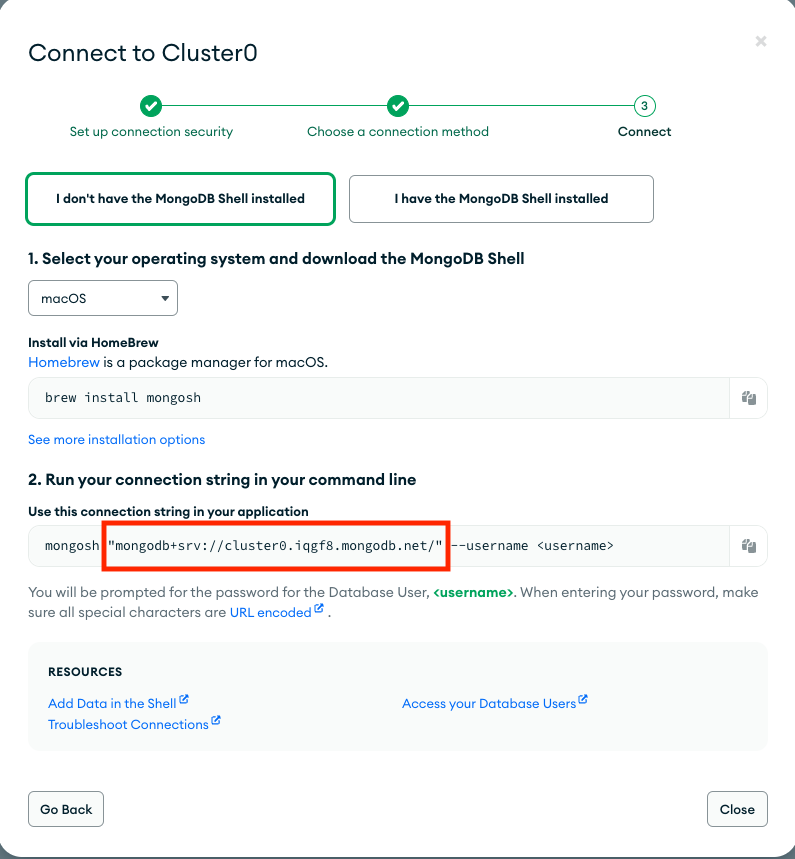
The string looks like mongodb+srv://cluster0.abcde.mongodb.net/. Paste it exactly as Atlas displays it. The connector removes surrounding quotation marks and the <username>:<password>@ placeholder. Enter credentials in the source’s Username and Password fields instead. The password is then stored as a secret. Atlas connections always use TLS.
Self-hosted cluster
See MongoDB connection string documentation to find a self-hosted deployment’s connection string. List every replica set member or each sharded cluster’s mongos router. This list lets the connector fail over when a member is unavailable. For example, use mongodb://host1:27017,host2:27017,host3:27017/?replicaSet=rs0. DNS seed lists (mongodb+srv://) also work.
The connector honours connection string options. In particular:
- Add
tls=trueto connect over TLS. See Configure mongod and mongos for TLS/SSL. - Set
readPreferenceto choose which members serve reads. Without this option, the connector usessecondaryPreferred. This reads the initial snapshot and change stream from an available secondary, leaving the primary for your application. - Set
compressorsto choose how the cluster’s traffic is compressed. Without this option, the connector requestssnappy, thenzlib. It uses the first option the cluster supports. An emptycompressors=disables compression. - You can embed credentials as
mongodb://user:password@host…, but the Username and Password fields are preferred. The connection string is stored in clear text, while the password field is stored as a secret. When you set both, the fields take precedence.
Step 3: Configure the MongoDB source
In Airbyte, go to Sources, click + New source and choose MongoDB. Then complete these fields:
- Cluster Type: MongoDB Atlas or self-hosted.
- Connection String: the string from Step 2.
- Database Names: the databases containing the collections you want to sync. Add one name per entry. Multiple databases require the
readAnyDatabaseprivilege from Step 1. - Username and Password: the user from Step 1. These fields are required for Atlas. For self-hosted clusters, leave them empty only when authentication isn’t required.
- Schema Enforced: leave it enabled unless your documents don’t share a structure. See Schema Enforcement.
Keep the default advanced settings unless you need to change them. See Configuration Parameters for details.
Click Set up source. Airbyte tests the connection before saving. It checks the cluster is reachable with your credentials and the user can list collections in configured databases. If the user can’t read a database, the error names it. A standalone server passes with a log warning, but its Incremental syncs fail. Airbyte then discovers the collections. When Schema Enforced is enabled, it samples documents to build the schema. See Schema Enforcement. Discovery can take several minutes on clusters with many collections.
Step 4: Allow inbound Airbyte traffic
If your cluster only accepts known addresses, allow the relevant Airbyte addresses:
- Airbyte Cloud: add the Airbyte Cloud IP addresses to your allow list. In Atlas, use Network Access under Security.
- Self-managed Airbyte: allow the addresses of machines or Kubernetes nodes running your Airbyte workers.
Replication methods
Each collection is a stream you can sync in Full Refresh or Incremental mode.
Full Refresh
Each full refresh reads the entire collection, ordered by _id. The connector checkpoints progress after roughly every gigabyte of documents. If a sync fails partway through, it continues from the last checkpointed _id instead of restarting. A network error can cause this failure, for example.
Incremental (CDC)
An incremental sync runs in two phases:
- Initial snapshot. The first sync reads the entire collection, ordered by
_idand checkpointed as described above. Before the snapshot, the connector records the current change stream position. This prevents changes during a long initial load from being lost. The next sync replays them. - Change streams. Later syncs resume the change stream from its saved position. They emit every insert, update, replace and delete made before the sync started. An update record contains the document’s state when the event is read, using MongoDB’s
updateLookup. Therefore, several rapid updates can all show the final state. The next sync collects changes made while the current sync runs. This prevents a busy cluster from keeping a sync open indefinitely. Delete records have_ab_cdc_deleted_atset. They include the deleted document when the collection stores pre-images on MongoDB 6.0 or later. Otherwise, they include only its_id. If an updated document is deleted before the connector reads it back, the update is emitted as a delete.
To understand how Airbyte implements CDC, see Change Data Capture (CDC).
Change streams use the replica set oplog, which retains changes for a limited period. If the saved position has left the oplog, the sync fails or restarts. The Invalid CDC position behavior setting controls this behaviour. Long initial snapshots are protected automatically. A snapshot running longer than 8 hours pauses, saves its progress and retries. The retry reads the change stream before resuming the snapshot from its saved position. See MongoDB Oplog and Change Streams for oplog sizing guidance.
Every incremental record includes three metadata fields. _ab_cdc_updated_at contains a change-stream event’s change time or a snapshot row’s sync time. _ab_cdc_deleted_at is set for deletes. _ab_cdc_cursor contains the stream cursor. This is a change event’s oplog time or the saved change-stream position for a snapshot row. Therefore, a later change always supersedes the row it replaces.
Requirements for the _id field
The connector orders and resumes reads using _id. Keep these requirements in mind:
- Use one BSON type for
_idthroughout a collection. Integers, longs, doubles and decimals count as one type. MongoDB sorts_ids by type before value. A resumed read continues only with the checkpointed type. A collection mixing types, such as integer and string_ids, is fully read if uninterrupted. After a checkpoint, documents with other types aren’t synced. When the collection read starts, the connector logsThe _id fields in this collection are not consistently typed, which may lead to data losswith the types found. Make the_idtype consistent or exclude the collection from the connection. - Checkpoints are exact for every
_idtype. These includeObjectId, string, integer, long, double, decimal, date, timestamp, binary, embedded document and remaining BSON types. Binary includes UUIDs.
Schema enforcement
By default, the connector enforces a schema. During setup and each schema refresh, it samples a configurable number of documents from every collection. It collects top-level fields and infers each field’s type. You can then deselect fields in the connection’s replication settings. The server returns only fields included in the schema.
The schema is inferred, not declared. Keep these points in mind:
- A field missing from sampled documents isn’t included in the schema. It won’t sync until you refresh the schema.
- When a field contains different types, the schema uses the first type found. Values are still emitted in their original types. For example, a string remains a string in a field typed
number. Typed destinations may reject the value, causing it to arrive asnull. Schemaless mode is better for these collections. - Empty collections have no fields to sample, so they aren’t discovered.
- Views and time series collections aren’t synced or discovered. MongoDB provides no change streams for either. Time series collections also lack a
_idindex for checkpointing and resuming snapshots. For a view, sync its underlying collection instead.
When Schema Enforced is disabled, collections use schemaless mode. This mode doesn’t assume documents share a structure. Each document creates a record with exactly two top-level fields:
{
  "_id": <document id>,
  "data": {<the whole document, _id included>}
}
The contents of data vary by document. No field is omitted and no document is rejected. A field can be a string in one record and an object in the next. You can’t deselect fields in schemaless mode. Schema discovery is lighter because sampling only identifies the type of _id.
Array type normalisation
Most destinations can safely cast between primitive types, such as integer to string. They can’t reconcile composite types, such as an object and an array. Without normalisation, records with this mismatch would be written as NULL in the destination. In schema-enforced mode, the connector handles fields with a schema type of array. It wraps each non-array value in a one-element array.
// Document 1 - Array (matches schema)
{ "reviews": [{"rating": "A"}, {"rating": "B"}] }

// Document 2 - Single object (auto-wrapped)
{ "reviews": {"rating": "A"} }  →  { "reviews": [{"rating": "A"}] }
:::info This normalisation handles occasional type inconsistencies. If your collection’s fields change types frequently, consider schemaless mode instead. :::
Data type mapping
BSON types map to the following Airbyte types in the discovered schema. The notes explain how their values are emitted. The same conversions apply within schemaless mode’s data, nested documents and arrays.
MongoDB Data Type Mapping
| BSON type | Resulting type | Notes |
|---|---|---|
objectId | string | 24-character hexadecimal string |
string | string | |
bool | boolean | |
int, long | number | Emitted as JSON numbers without a fractional part |
double | number | Emitted as a JSON number; NaN and the infinities, which JSON has no number for, as the strings NaN, Infinity and -Infinity |
decimal | number | Emitted with its full precision; NaN and the infinities as the strings NaN, Infinity and -Infinity |
date | string | ISO 8601 in UTC with milliseconds, e.g. 2024-01-01T00:00:00.000Z |
timestamp | string | MongoDB’s internal timestamp. Its 64-bit value is rendered as an ISO 8601 date-time as if it were milliseconds since the epoch, which produces a far-future date; this is kept for backward compatibility. Use a date field to store points in time. |
binData | string | Base64 encoding of the bytes, for every subtype (UUIDs included) |
regex | string | (options)pattern, or just the pattern when there are no options |
javascript | string | The code |
javascriptWithScope | object | {"code": <code>, "scope": <scope document>} |
symbol | string | |
object | object | The embedded document, converted with the same rules |
array | array | Elements converted with the same rules; the schema does not declare an element type |
null | null | |
minKey, maxKey, undefined, dbPointer | — | Not synced: the value is omitted from data and nested documents, and null in schema-enforced mode |
Limitations and troubleshooting
For connector limitations and MongoDB connector troubleshooting, see in our MongoDB troubleshooting guide.
Schema discovery performance
:::warning Schema discovery runs aggregation queries against your MongoDB cluster in parallel across all collections of a database. Production clusters with many collections or large documents can experience significant resource pressure. Effects can include degraded query performance, replication lag and, in extreme cases, cluster instability. :::
MongoDB collections are schemaless, so no sample size guarantees a complete or stable schema. New fields can appear in documents at any time. With schema enforcement enabled, Discover runs $sample aggregation pipelines against every collection in the configured databases in parallel. These concurrent queries can place significant pressure on clusters with many collections or large documents. This pressure can degrade performance or destabilise the cluster.
For recommended approaches and other ways to protect your production cluster, see Schema discovery performance impact in the troubleshooting guide.
MongoDB CDC limitations
MongoDB limits BSON documents to 16MB. During CDC syncs, change stream events for large documents can exceed this limit. This causes a BSONObjectTooLarge error. For resolution details, see MongoDB CDC Limitations in the troubleshooting guide.
Configuration parameters
| Parameter Name | Description |
|---|---|
| Cluster Type | Whether the cluster is hosted on MongoDB Atlas or self-hosted. Connections to Atlas always use TLS and require a username and password. |
| Connection String | The connection string of the source MongoDB cluster. For Atlas hosted clusters, see the quick start guide for steps to find the connection string. For self-hosted clusters, refer to the MongoDB connection string documentation. Connection string options such as tls and readPreference are honored. |
| Database Names | The names of the MongoDB databases that contain the collections to sync. Configuring more than one database requires readAnyDatabase privileges (see Step 1). |
| Username | The username which is used to access the database. Required for MongoDB Atlas clusters. |
| Password | The password associated with this username. Required for MongoDB Atlas clusters. |
| Schema Enforced | Controls whether a schema is discovered and enforced. Defaults to on. See Schema Enforcement. |
| Document discovery sample size (Advanced) | The maximum number of documents to sample per collection when discovering its fields. Default is 10,000 with a valid range of 10 to 100,000. See the MongoDB sampling method for more details. |
| Invalid CDC position behavior (Advanced) | What to do when the saved change stream position is no longer valid, usually because the oplog no longer contains it. If “Fail sync” is chosen, the sync fails until you refresh the connection (a refresh takes a new initial snapshot; choose whether to keep or remove the existing records) or clear it. If “Re-sync data” is chosen, the connector discards the saved position and snapshot progress and takes a new initial snapshot, which increases cost and misses the changes that occurred while the position was invalid. Default is “Fail sync”. |
Changelog
Expand to review
| Version | Date | Pull Request | Subject |
|---|---|---|---|
| 3.0.2 | 2026-11-01 | 90322 | Upgrade to Bulk CDK 1.2.3. |
| 3.0.1 | 2026-10-28 | 90162 | Hide auth_source from the setup form; it defaults to admin when not set. |
| 3.0.0 | 2026-10-27 | 89773 | Rewrite on the Bulk CDK: change streams are read with the MongoDB driver instead of Debezium; existing connections upgrade in place; no clear or refresh needed. Docker image renamed from airbyte/source-mongodb-v2 to airbyte/source-mongodb. Views and time series collections are no longer discovered; booleans typed as boolean; decimals keep full precision; initial_waiting_seconds, queue_size and update_capture_mode removed. See the migration guide. |
| 2.1.1 | 2026-09-26 | 87019 | Harden initial load iterator: surface sub-query failures instead of silently ending the stream, and fail with the intended transient error on CDC initial-load timeout. |
| 2.1.0 | 2026-09-02 | 83705 | Support sharded clusters and object-type _id fields; detect _id types with index seeks instead of a full collection scan; bump Debezium to 3.6.2 and base image to 2.0.4 |
| 2.0.7 | 2026-01-21 | 71049 | Use debezium’s own token validation logic to ensure that the saved resume token is present on the server (h/t @ed-kyu) |
| 2.0.6 | 2026-01-21 | 70980 | Convert non-array MongoDB values into arrays when the schema expects an array to prevent nulls. |
| 2.0.5 | 2026-01-14 | 71255 | fix(source-mongodb-v2): Add helpful error message for BSONObjectTooLarge errors during CDC syncs |
| 2.0.4 | 2025-09-10 | 65579 | Add validation to ensure state format consistency. |
| 2.0.3 | 2025-08-12 | 64900 | Fix hardcoded read preferences to allow specification in connection string. |
| 2.0.2 | 2025-07-14 | 62938 | Only require a single database read permission when configured to sync a single database. |
| 2.0.1 | 2025-06-04 | 61369 | Do not pin on 1.5.17 |
| 2.0.0 | 2025-05-27 | 60252 | Add support for multiple databases |
| 1.5.19 | 2025-05-15 | 60311 | Migrate to new Gradle flow |
| 1.5.18 | 2025-04-24 | 58132 | Fix vulnerabilities in dependencies. |
| 1.5.17 | 2025-04-17 | 58111 | Implement timeout for document discovery |
| 1.5.16 | 2025-04-02 | 56973 | Update logging configuration. |
| 1.5.15 | 2025-03-06 | 55234 | Update base image version for certified DB source connectors |
| 1.5.14 | 2025-01-10 | 51491 | Use a non root base image |
| 1.5.13 | 2024-12-18 | 49868 | Use a base image: airbyte/java-connector-base:1.0.0 |
| 1.5.12 | 2024-11-01 | 48115 | Remove database name check. |
| 1.5.11 | 2024-09-24 | 45883 | Lazy init mongocursor to prevent timeout. |
| 1.5.10 | 2024-09-17 | 45639 | Adopt latest CDK to use the latest apache sshd mina to handle tcpkeepalive requests. |
| 1.5.9 | 2024-08-28 | 42927 | Support binary subtype. |
| 1.5.8 | 2024-08-27 | 44841 | Adopt latest CDK. |
| 1.5.7 | 2024-08-27 | 44846 | DBZ filters in related streams only. |
| 1.5.6 | 2024-08-27 | 44839 | DBZ filters in related streams only. |
| 1.5.5 | 2024-08-26 | 44779 | Revert permission check on oplog.rs. |
| 1.5.4 | 2024-08-20 | 44490 | Add read permission check on oplog.rs collection used by CDC. |
| 1.5.3 | 2024-08-08 | 43410 | Adopt latest CDK. |
| 1.5.2 | 2024-08-06 | 42869 | Adopt latest CDK. |
| 1.5.1 | 2024-08-01 | 42549 | Centered the connector icon. |
| 1.5.0 | 2024-07-26 | 42561 | Implement WASS algorithm. |
| 1.4.3 | 2024-07-22 | 39145 | Warn (vs fail) on different _id types in collection. |
| 1.4.2 | 2024-07-01 | 40516 | Remove dbz hearbeat. |
| 1.4.1 | 2024-06-11 | 39530 | Adopt new CDK. |
| 1.4.0 | 2024-06-11 | 38238 | Update mongodbv2 to use dbz 2.6.2 |
| 1.3.15 | 2024-05-30 | 38781 | Sync sending trace status messages indicating progress. |
| 1.3.14 | 2024-05-29 | 38584 | Set is_resumable flag in discover. |
| 1.3.13 | 2024-05-09 | 36851 | Support reading collection with a binary _id type. |
| 1.3.12 | 2024-05-07 | 36851 | Upgrade debezium to version 2.5.1. |
| 1.3.11 | 2024-05-02 | 37753 | Chunk size(limit) should correspond to ~1GB of data. |
| 1.3.10 | 2024-05-02 | 37781 | Adopt latest CDK. |
| 1.3.9 | 2024-05-01 | 37742 | Adopt latest CDK. Remove Debezium retries. |
| 1.3.8 | 2024-04-24 | 37559 | Implement fixed-size chunking while performing initial load. |
| 1.3.7 | 2024-04-24 | 37557 | Change bug in resume token validity check. |
| 1.3.6 | 2024-04-24 | 37525 | Internal refactor. |
| 1.3.5 | 2024-04-22 | 37348 | Do not send estimate trace if we do not have data. |
| 1.3.4 | 2024-04-16 | 37348 | Populate null values in airbyte record messages. |
| 1.3.3 | 2024-04-05 | 36872 | Update to connector’s metadat definition. |
| 1.3.2 | 2024-04-04 | 36845 | Adopt Kotlin CDK. |
| 1.3.1 | 2024-04-04 | 36837 | Adopt CDK 0.28.0. |
| 1.3.0 | 2024-03-15 | 35669 | Full refresh read of collections. |
| 1.2.16 | 2024-03-06 | 35669 | State message will now include record count. |
| 1.2.15 | 2024-02-27 | 35673 | Consume user provided connection string. |
| 1.2.14 | 2024-02-27 | 35675 | Fix invalid cdc error message. |
| 1.2.13 | 2024-02-22 | 35569 | Fix logging bug. |
| 1.2.12 | 2024-02-21 | 35526 | Improve error handling. |
| 1.2.11 | 2024-02-20 | 35375 | Add config to throw an error on invalid CDC position and enable it by default. |
| 1.2.10 | 2024-02-13 | 34751 | Emit analytics message for invalid CDC cursor. |
| 1.2.9 | 2024-02-13 | 35114 | Extend subsequent cdc record wait time to the duration of initial. Bug Fixes |
| 1.2.8 | 2024-02-08 | 34748 | Adopt CDK 0.19.0 |
| 1.2.7 | 2024-02-01 | 34759 | Fail sync if initial snapshot for any stream fails. |
| 1.2.6 | 2024-01-31 | 34594 | Scope initial resume token to streams of interest. |
| 1.2.5 | 2024-01-29 | 34641 | Allow resuming an initial snapshot when Id type is not of default ObjectId . |
| 1.2.4 | 2024-01-26 | 34573 | Adopt CDK v0.16.0. |
| 1.2.3 | 2024-01-18 | 34364 | Add additional logging for resume token + reduce discovery size to 10. |
| 1.2.2 | 2024-01-16 | 34314 | Reduce minimum document discovery size to 100. |
| 1.2.1 | 2023-12-18 | 33549 | Add logging to understand op log size. |
| 1.2.0 | 2023-12-18 | 33438 | Remove LEGACY state flag |
| 1.1.0 | 2023-12-14 | 32328 | Schema less mode in mongodb. |
| 1.0.12 | 2023-12-13 | 33430 | Add more verbose logging. |
| 1.0.11 | 2023-11-28 | 33356 | Support for better debugging tools. |
| 1.0.10 | 2023-11-28 | 32886 | Handle discover phase OOMs |
| 1.0.9 | 2023-11-08 | 32285 | Additional support to read UUIDs |
| 1.0.8 | 2023-11-08 | 32125 | Fix compilation warnings |
| 1.0.7 | 2023-11-07 | 32250 | Add support to read UUIDs. |
| 1.0.6 | 2023-11-06 | 32193 | Adopt java CDK version 0.4.1. |
| 1.0.5 | 2023-10-31 | 32028 | url encode username and password. Handle a case of document update and delete in a single sync. |
| 1.0.3 | 2023-10-19 | 31629 | Allow discover operation use of disk file when an operation goes over max allowed mem |
| 1.0.2 | 2023-10-19 | 31596 | Allow use of temp disk file when an operation goes over max allowed mem |
| 1.0.1 | 2023-10-03 | 31034 | Fix field filtering logic related to nested documents |
| 1.0.0 | 2023-10-03 | 29969 | General availability release using Change Data Capture (CDC) |
| 0.2.5 | 2023-07-27 | 28815 | Revert back to version 0.2.0 |
| 0.2.4 | 2023-07-26 | 28760 | Fix bug preventing some syncs from succeeding when collecting stats |
| 0.2.3 | 2023-07-26 | 28733 | Fix bug preventing syncs from discovering field types |
| 0.2.2 | 2023-07-25 | 28692 | Fix bug preventing statistics retrieval from views |
| 0.2.1 | 2023-07-21 | 28527 | Log server information |
| 0.2.0 | 2023-06-26 | 27737 | License Update: Elv2 |
| 0.1.19 | 2022-10-07 | 17614 | Increased discover performance |
| 0.1.18 | 2022-10-05 | 17590 | Add ability to enforce SSL in MongoDB connector and check logic |
| 0.1.17 | 2022-09-08 | 16401 | Fixed bug with empty strings in fields with aibyte_transform |
| 0.1.16 | 2022-08-18 | 14356 | DB Sources: only show a table can sync incrementally if at least one column can be used as a cursor field |
| 0.1.15 | 2022-06-17 | 13864 | Updated stacktrace format for any trace message errors |
| 0.1.14 | 2022-05-05 | 12428 | JsonSchema: Add properties to fields with type ‘object’ |
| 0.1.13 | 2022-02-21 | 10276 | Create a custom codec registry to handle DBRef MongoDB objects |
| 0.1.12 | 2022-02-14 | 10256 | (unpublished) Add -XX:+ExitOnOutOfMemoryError JVM option |
| 0.1.11 | 2022-01-10 | 9238 | Return only those collections for which the user has privileges |
| 0.1.10 | 2021-12-30 | 9202 | Update connector fields title/description |
| 0.1.9 | 2021-12-07 | 8491 | Configure 10000 limit doc reading during Discovery step |
| 0.1.8 | 2021-11-29 | 8306 | Added milliseconds for date format for cursor |
| 0.1.7 | 2021-11-22 | 8161 | Updated Performance and updated cursor for timestamp type |
| 0.1.5 | 2021-11-17 | 8046 | Added milliseconds to convert timestamp to datetime format |
| 0.1.4 | 2021-11-15 | 7982 | Updated Performance |
| 0.1.3 | 2021-10-19 | 7160 | Fixed nested document parsing |
| 0.1.2 | 2021-10-07 | 6860 | Added filter to avoid MongoDb system collections |
| 0.1.1 | 2021-09-21 | 6364 | Source MongoDb: added support via TLS/SSL |
| 0.1.0 | 2021-08-30 | 5530 | New source: MongoDb ported to java |